
Two-Step Authentication
Two-Step Authentication Enrollment
What is 2-step authentication?
2-step authentication is a verification method that goes beyond a traditional username and password. This authentication helps protect your online accounts by requiring additional information that only you have access to. For example, when 2-step authentication is prompted at login, you will receive a one-time passcode via SMS text message to verify your identity. No one else has this code and you should never provide the code to anyone else.
When you set up your account, you are required to link a phone number to serve as your default 2-step authentication method. Then you have the option to establish enhanced 2-step authentication methods for your account by logging in and navigating to Settings -> Security -> 2-step authentication.
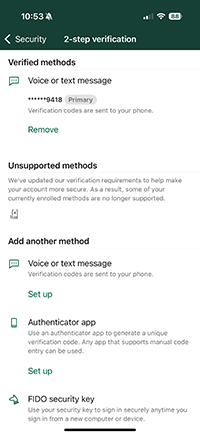
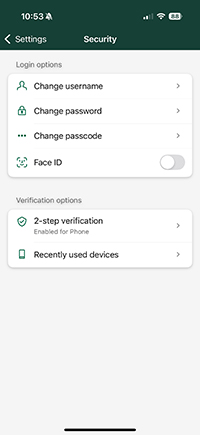
2-step authentication options:
Phone/Text - (Standard Security)
Receive your verification code via SMS text message or automated phone call. This is our default method in digital banking.
Authenticator App - (Enhanced Security)
Protects from phone-based attacks including smishing and SIM swapping. An authenticator app adds a unique, time sensitive code that only your phone can generate using an application such as Microsoft Authenticator or Google Authenticator, which can be easily downloaded for free from the App or Google Play stores.
FIDO security key – (High Security)
Requires a physical security key or device and provides complete protection from remote account takeover. All account access requires physical possession of the security device or trusted computer. Any security key rated for FIDO can be set up as a 2-step authentication method.