
Digital Security Center
Get started with these useful links to keep your account information safe and secure.

West Gate Bank® takes pride in the fact that you trust and bank with us.
We take steps to safeguard all customer information. We restrict access to your personal account information to those employees who need to know that information to provide products or services to you. We maintain physical, electronic and procedural safeguards that comply with federal standards to guard your nonpublic personal information.
Suspect Fraud or Unauthorized Account Activity? - Take Action Now.
If you believe your account or personal information has been compromised:
Contact our Solutions Center right away at 402.434.3456 to address the situation with a trusted representative.
If someone claiming to represent West Gate Bank has contacted you independently over the phone, hang up and do not answer further calls from that number. Call us using the trusted contact information listed on the Contact Us page of our web site. Our bank representatives will never ask for your online banking password or two-factor authentication codes. Please use caution when relying on caller ID when answering calls claiming to be from West Gate Bank, as caller ID can be impersonated (spoofed).
After Business Hours
If it is after business hours, call 402.853.7232 to immediately report fraud on your debit card.
If you can access your online banking, you can turn off your debit card in the app:
- From the Dashboard, find your debit card in the “Card management” section and click to view more options.
- Use the green toggle button at the top of the menu to turn the card off and on at your discretion.
- You can also report the card as lost or stolen from this menu.
After taking these steps:
- Contact us during business hours so our bank staff can assist you.
- Change your password for your online banking account in case a fraudster has obtained your current password.
When you contact us, we will:
- Review and secure your accounts
- Investigate any suspicious activity
- Reissue cards or credentials, if needed
- Guide you through recovering your account access, if applicable
Report Suspicious Messages
If you received a suspicious call, text, or email that claims to be from us, please forward it to customersupport@westgate.bank and include any additional information you can provide.
Protect Your Accounts Going Forward
Consider taking these additional steps to keep your online accounts safe and secure.
- Change the password of any account that shared the same password as your online banking account.
- Use strong, unique passwords for every account you use online.
- Enable Account Alerts in online banking to receive real-time transaction notifications to your email or phone.
- Never share your login information, one-time code, or two-step authentication information with anyone, even someone claiming to work for West Gate Bank.
Education Center
Here are some of the current topics in digital security with suggestions on how you can be proactive to secure your information.
Two-Step Authentication
Learn more about Two-Step Authentication and how it can help to protect your online information.
Phishing & Online Scams
Every day, thousands of people fall victim to phishing and online scams. Learn how to protect yourself.
Lost or Stolen Card
If your West Gate Bank® ATM or Debit Card is lost, stolen, or has been misplaced, please take action as soon as possible to secure your funds.
Personal Cyber Security Tips
We have assembled some safety tips to help you navigate the digital landscape.
Business Cyber Security Checklist
Here's a checklist of things you can do to help protect your business.
Account Take Over Fraud
Account takeover fraud is one of the most common forms of identity theft.
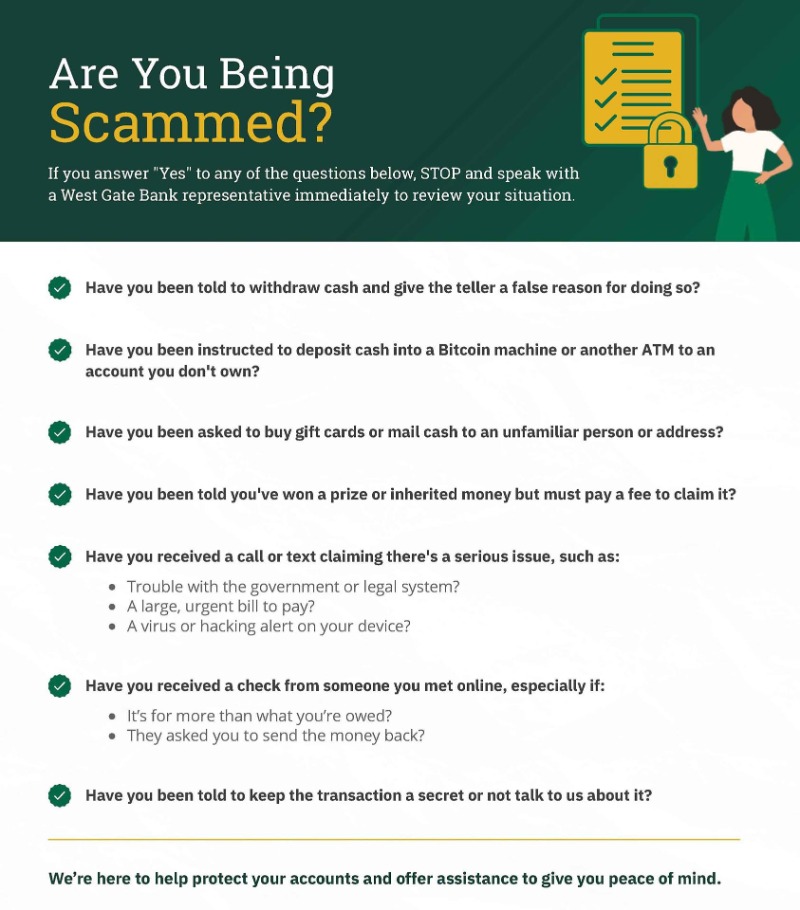
Frequently Asked Questions About
Cyber Security and Fraud
I believe I've been a victim of a scam using Zelle®. Who should I contact?
Please contact our Solutions Center at 402.434.3456. Qualifying imposter scams may be eligible for reimbursement.
I received a text that appears to come from West Gate Bank asking for my account credentials. Is this a real request?
No! We will never request personal credentials via text messages or emails. It’s important to verify the authenticity of the communication before clicking any links.
If you receive any suspicious communications or notice unusual requests for your banking information, do not interact with the links provided, including "Report as Junk", and report the incident to us immediately. If comfortable, please report the text message as junk through your messaging app.
Your security is our top priority, and we appreciate your diligence in helping us maintain a safe banking environment. Should you have any concerns or believe you may have been targeted, please reach out to us without delay through our official contact channels:
- Via our web site
- Call our Solutions Center at 402.434.3456
- Or contact a West Gate Bank branch
What's the difference between fraud and scams?
The primary difference is that fraud can happen without a victim's knowledge or consent, often involving stolen data, while a scam involves trickery and manipulation to get the victim to willingly provide their information or money. In essence, fraud is a broader category of dishonest deception for gain, and a scam is a specific type of fraud that relies on victim participation.
What are the most common types of fraud?
Account takeovers, identity theft, credit card fraud, phishing emails, and even fake investments.
What kinds of scams should I watch for?
Peer-to-peer payment requests, fake sellers, tech support scams, impersonators, and romance scams. Only send money to people you know – and double-check before you click.
How can I spot fraud before it happens?
Trust your gut. If something feels rushed, strange, or too good to be true – stop. Don’t click suspicious links or send money to people you don’t know.
What's the best way to protect my financial information?
Keep account numbers and login details private. Use strong, different passwords for every
account – and change them often.
account – and change them often.
What can I do to protect my online and mobile banking?
Keep apps updated. Use private networks, not public Wi-Fi. And turn on card controls to freeze your card fast if needed.
How can I tell if a call, text or email is legitimate?
If someone asks for your PIN or account number, it’s not us. When in doubt, hang up or delete the message – and call us directly.
How often should I check my accounts?
Every day, if you can. A quick look now can help you catch something suspicious before it becomes a bigger problem.
What should I do if I think I'm a fraud victim?
Call West Gate Bank right away at 402.434.3456. We're here to help you figure out what happened and what to do next.
How can I tell if a web site is fake?
Watch for small mistakes in the URL, no padlock or HTTPS, and bad design or spelling errors. When in doubt, don’t enter your personal details.
Should I use credit monitoring?
Yes. It can help you catch new accounts or credit changes tied to your name – and alert you after a data breach.


